Parqet Quicksearch: Quick Access to All Asset Pages in Your Browser Address Bar

Access the fundamental data of your favorite stocks or the composition of your most important ETFs directly without detours? With Parqet search, we now offer you a quick and simple solution right in your browser's address bar!
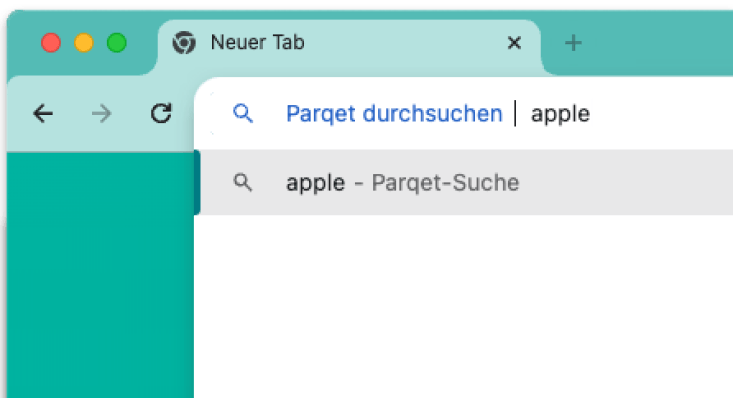
Quicksearch only needs to be set up once and you can access your assets even faster.
For an even more targeted search, we recommend using the ISIN or WKN of the desired asset. By entering the ISIN/WKN, you will go directly to the asset's detail page without having to navigate through the search results.
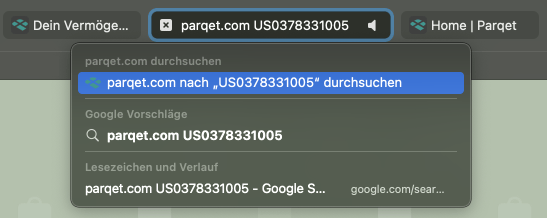
Here you will find a step-by-step guide on how to use this practical feature.
How to Set Up Quicksearch in Chrome
- Open Chrome Settings
Click on the three vertical dots in the upper right corner of the Chrome browser to open the menu. Select "Settings" from the dropdown menu.
- Go to Search Engine Settings
In the settings menu, you will find a menu bar on the left side. Click on "Search engine" here. In the search engine menu, select "Manage search engines" or "Manage search engines and site search" depending on your Chrome version.
- Add Parqet as a Search Engine
In the "Manage search engines" section, you will find a section titled "Site search" or a similar name. Click on "Add" here. A dialog box will open. Here you need to enter the following information:
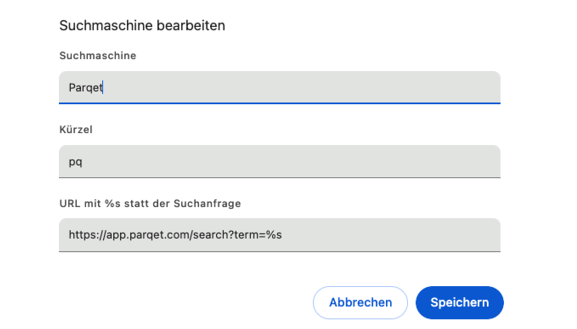
- Search engine: Enter a name for the search engine, e.g. "Parqet".
- Shortcut: Choose a shortcut or abbreviation that you want to use for the search, e.g. "parqet" or "pq".
- URL with %s instead of query: Enter the search URL:

         https://app.parqet.com/search?term=%s

  The "%s" serves as a placeholder for your search queries. Confirm the entry with "Add".
4. How to Use the New Search Engine
Go to the Chrome search bar (also called address bar or omnibox). Enter the shortcut you set (e.g. "parqet" or "pq") and press the "Tab" key. You will see that Chrome is now ready to search Parqet. Enter your search term and press the Enter key. You will be redirected directly to the search results on Parqet.
How to Set Up Quicksearch in Safari
- Your Browser's Address Bar
Start by entering "parqet.com" in your web browser's address bar. Instead of pressing the Enter key, press the "Tab" key on your keyboard. This signals to your browser that you want to perform a search within Parqet.
- Enter Your Search Term
After pressing "Tab", a prompt will appear in the address bar asking you to enter your search term. Here you can enter the name of the stock, ISIN, or other relevant information you are looking for.
- Start the Search
After entering your search term, confirm with the "Enter" key or click on the "Search on Parqet" option. You will be redirected directly to the Parqet search results.
How to Set Up Quicksearch in Firefox
- Open Firefox Settings:
Click on the three horizontal lines in the upper right corner of the Firefox browser to open the menu. Select "Settings" from the dropdown menu.
- Search for the Search Engine Setting:
In the settings menu, navigate to the "Search" category on the left side. Scroll down to the "Search Engines" section.
- Add a New Search Engine:
- Firefox does not allow manually adding a search URL directly. Instead, a search must be performed on the website, which Firefox recognizes and adds to the list of search engines. Visit https://app.parqet.com/search?term=%s .
- Right-click in the search bar and select "Add this search to Firefox".
- Select Parqet as Your Search Engine: After adding Parqet, the Parqet search will appear next to the other search engines in the settings.
- How to Use the Parqet Search: Once Parqet has been added as a search engine, you can enter "Parqet" in the address bar, followed by a "Tab" and then enter your search term. Press "Enter" to get to the Parqet search results page. Alternatively, you can click on the small Parqet logo in the address window and enter your search term.
New to Parqet?
With Parqet, we work every day to reduce the barriers to wealth building. To do this, we build tools that allow you to keep track of your portfolio with little effort, whether at home or on the go.
See how Parqet can simplify your wealth planning, or create your free portfolio in just a few seconds.
Create Portfolio